
What's New? - July 2022
Continuing with our slew of exciting releases this summer, let's take a look at our latest feature — multi-store functionality!
For Shopify merchants running multiple storefronts, this is a real game-changer.
Not only can you seamlessly switch between your stores in the app without needing to continually login separately, but you can even combine the data from both stores and compare it side-by-side in the same report!
Let's take a look, shall we?
Multiple Stores and Report Toaster
Much like switching between storefronts in the Shopify admin, we tried to make the process intuitive to switch between which store's data you are viewing in Report Toaster.
After you setup multi-store for your account, you can easily toggle which storefronts are applied for any reports where multi-store is applicable.
Note — which stores you have toggled will stay that way until you change the toggles again, including between login sessions.
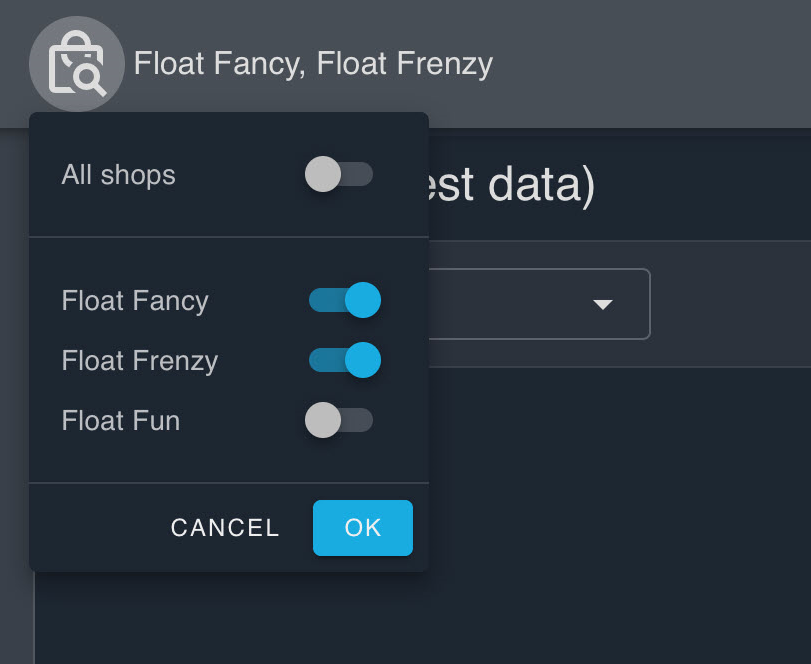
Simply pull up a report and click the shopping bag icon at the top. As you can see from the dropdown, you can easily choose between your different stores (or even check all of them if you want to see combined data from every store).
(click image to enlarge)
This is very helpful, enabling you to view sales or inventory from different stores without having to continuously switch between them in the Shopify Admin.
Better yet, you can even use the All shops toggle or switch them all on individually to look at every store at once.
(The other stores you have linked will display when All shops is toggled off.)
Note: Multi-store functionality is only available on paid plans of Report Toaster. You can sign up anytime by visiting https://reporttoaster.cloudlab.com/subscribe.
Time to see how this works in practice…
Comparing Data Between Different Stores
If you've been looking for ways to compare your data side-by-side between your different stores, then our new multi-store functionality is perfectly suited for the task.
So long as you have more than one store toggled, you can pull up data from multiple stores in a report.
This is a great option if you want to see your total sales across all your stores, or get a combined view of all your inventory.
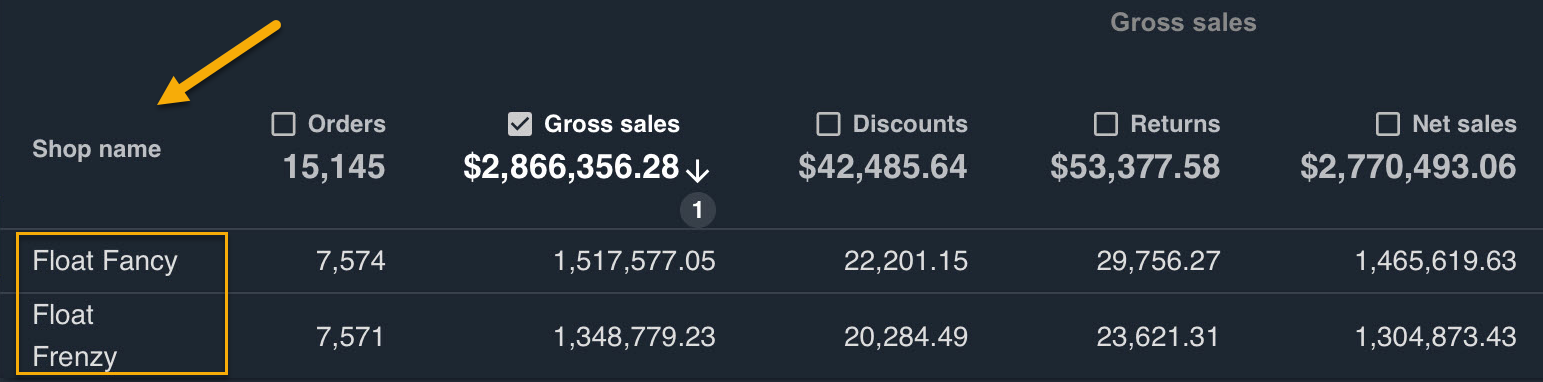
Better yet — you can even add a column for store name and compare your numbers side-by-side in the same report:
(click image to enlarge)
Note: This example will only work for storefronts that use the same currency. For storefronts containing multiple different currencies, please contact us to discuss your needs in further detail.
By doing this, you can easily track and compare results across multiple storefronts. You can use reports like this to assess their relative performance or introduce filters to examine specific results.
For example, you could have the report only show sales which contain a specific Product Title. This would let you see immediately which store has sold more of a given product.
You get the idea.
Setting This Up
Setting up multi-store functionality is easy. All you need to do is:
1.) Have a paid copy of Report Toaster on each of the storefronts you want to link.
2.) Contact us via [email protected] to let us know which accounts you want to connect.
3.) We'll do the rest.
4.) …that's it? :)
Nice and simple. In fact, we've already implemented multi-store functionality for a number of our merchants already, so if you need help setting this up for your storefronts, feel free to let us know!
Until next time!